Questions this page gets asked
How many words is an Instagram Reel transcript?
At the 148.2 words a minute our own reference material runs at - 229 words over 92.7 seconds - a 15-second Reel comes out at 37 words, 30 seconds at 74, one minute at 148 and 90 seconds at 222. That rate is a mean: our own eight clips run 117.9 to 198.0 words a minute, so a 15-second Reel holds 29.5 words at the slow end and 49.5 at the fast end. That matters because the accuracy figure moves in steps set by the word count: one wrong word is 2.70 points on the 37-word transcript, 1.35 on the 74-word one, 0.67 on the minute and 0.45 at 90 seconds. None of the 20 pages we read prints a word count for a Reel, so none of them can tell you what its own accuracy figure is worth on one.
Does the transcript include the words written on the Reel?
No. Only the audio track is read. We put seven words - HOOK BURNED INTO PICTURE NEVER SPOKEN ALOUD - on a 720x1280 frame over the same 12.485-second recording. The transcript came back byte-identical to the version with a blank frame: 174 characters, 32 words, and 0 of the 7 written words. The file grew by 16,754 bytes, from 121,777 to 138,531. The same seven words over silence returned 0 characters.
Can I get the caption that sits under the post?
Not from the media file. The caption is stored with the post, not inside the video, so a tool that only has the file cannot see it. One page in the twenty says this out loud - transcriptmagic sends you to a separate guide for the post caption - and one API returns it as a field of its own next to the transcript. The other pages use the word caption to mean subtitles.
Why did my music-only Reel come back empty?
Because there is nothing spoken in it. We ran a 12.485-second instrumental bed - a C major triad with a 70 Hz pulse every half second - through the live page and got 0 characters in 25.4 seconds. Three of the twenty pages say a music-only clip has nothing to transcribe; none of them gives a number for it. An audio transcript of a track with no voice is empty by definition, not by failure.
Can I paste an Instagram link into this site?
No. This page transcribes a file you already have: save the Reel, then drop the file on the front page. Every one of the 25 URLs we found is a link-paste tool, an API or a scraper - that is the single biggest difference between them and this page. What you get in exchange is that the recognition runs inside your browser tab and the file is never uploaded. The ceiling is 30 minutes of audio and 512 MiB per job.
Why do these pages claim 99.9% accuracy?
Eight of the 20 print a numeric accuracy figure - 95%+, 98.7%, 99%, 99.4%, 99.9% - and exactly one of the eight says what it was measured on: transcriptmagic cites an internal benchmark of 2,000 Instagram videos. On a 37-word Reel transcript, 99.9% is 0.037 of a word, which one clip cannot show. What one clip can show is 0, 1, 2 or 3 wrong words: 0%, 2.70%, 5.39% or 8.09%.
A Reel carries three layers of text, and a transcript reaches one of them
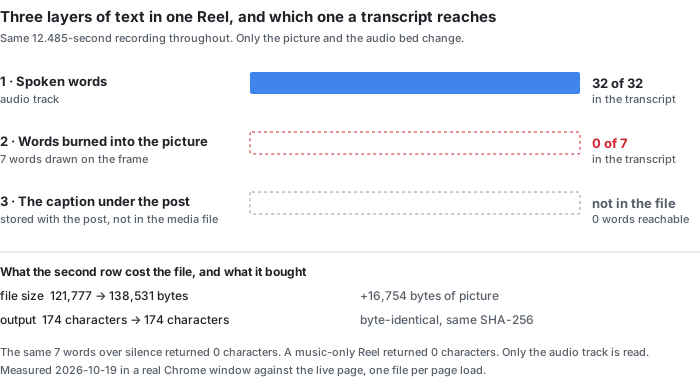
This is the part the 20 pages we read mostly skip. ◇A Reel can carry text in three places, and they need three different machines to read them:
| layer | where it lives | what has to read it | this page |
|---|---|---|---|
| spoken words | the audio track | speech recognition | yes |
| words burned into the picture hook line, captions, stickers | the video frames | optical character recognition | no — the picture is never decoded |
| the caption under the post | the post, not the media file | copying it out of the app | no — it is not in the file at all |
◇People search all five phrases meaning any of the three. ◇Eighteen of the 20 pages use the word “caption”, and in almost every one of them it means subtitles — the thing you burn onto the video — not the block of text under the post. One page separates the two out loud: transcriptmagic answers “How do I copy the caption or the on-screen text instead?” with “This tool gets the spoken words” and sends you to a different guide. One API returns the post caption as a field of its own, next to the transcript: apify's actor lists “caption, timestamp, transcript, hashtags” as separate outputs. ◇The other eighteen do not raise it.
And the platform itself has no transcript to copy. One API states it in a comparison table, in a row of its own: “Native captions — Not available on Instagram — transcripts are AI-generated”. ◇That is why the phrase has twenty tools behind it and no copy-paste answer: on YouTube there is a caption track to take, and on Instagram there is only audio, a picture and a post.
◇None of the 20 claims to read the words out of the picture. The only page that names the idea is reccloud, a guide rather than a tool, and it names it as a different kind of product: “you need tools that transcribe audio or extract on-screen text”. That is the honest split. ◇Speech recognition and optical character recognition are two machines, and every one of the 20 pages we read sells the first one while the search phrase often wants the second.
The test: seven words on the picture, none in the text
◆One recording, one variable at a time. ◆Everything below was built with ffmpeg, handed to the live page in a real Chrome window, one file per page load, and the page's own output was read back. ◆The run is recorded in data/instagram-text-layers-2026-10-19.csv.
- The recording. ◆12.485 seconds of real recorded speech, 32 reference words, one of the eight clips this site's error-rate work uses (light real noise, no music).
- The frame. ◆720×1280 at 30 frames per second, the shape of a phone Reel, filled with one flat colour.
- The words. ◆Seven of them, drawn on the frame in 64-pixel white type, two lines, centred: HOOK BURNED INTO / PICTURE NEVER SPOKEN ALOUD. ◆None of the seven appears in the spoken reference text.
- The two controls. ◆The same speech with no picture at all, and the same speech under a blank frame. If the picture mattered, these three would differ.
- The two empty cases. ◆The same seven words over silence, and a 12.485-second instrumental bed with no voice in it.
| file | picture | audio | bytes | output | on-screen words found |
|---|---|---|---|---|---|
| a-audio-only.mp3 | none | speech | 37,916 | 174 chars / 32 words | — |
| b-picture-no-text.mp4 | 720×1280, blank | speech | 121,777 | 174 chars / 32 words | — |
| c-picture-with-text.mp4 | 720×1280, 7 words | speech | 138,531 | 174 chars / 32 words | 0 of 7 |
| d-silent-with-text.mp4 | 720×1280, 7 words | silence | 49,379 | 0 chars | 0 of 7 |
| e-music-only.mp4 | 720×1280, blank | instrumental | 227,522 | 0 chars | — |
Read rows one to three together. ◆The transcript is byte-identical across all three — the same 174 characters, the same SHA-256 prefix 6c759c1b6c2d4429 — while the files themselves run from 37,916 to 138,531 bytes. ◆Drawing the seven words cost 16,754 bytes of picture data, 13.8% of the file, and bought 0 characters of text. ◆A tool that hands you a transcript of a Reel has handed you the audio and nothing else, and that is true of every tool we read a page for, ours included.
Rows four and five are the other half. ◆Seven written words over silence return 0 characters in 4.2 seconds — not the seven words, not a guess at them. ◆A 12.485-second instrumental bed returns 0 characters in 25.4 seconds. ◆There is no hallucinated lyric and no filler sentence; the recogniser reports nothing, which is the right answer and also the least useful one if the Reel you care about is the one with the words on the screen.
What a Reel's transcript weighs: 37 words at 15 seconds on the mean rate, 29 to 50 across our own clips
The 148.2 words a minute is not a guess. ◆It is 229 reference words over 92.7 seconds of audio — the eight clips behind this site's error-rate pages, seven of them real recorded speech. Every count below is that rate multiplied by the length of the Reel. ◆(The clip used in the test above runs slightly faster than the corpus: 32 words in 12.485 seconds is 153.8 a minute.)
| Reel length | words at 148.2/min | one wrong word | three wrong words | what 99.9% would be |
|---|---|---|---|---|
| 15 s | 37.1 | 2.70 pts | 8.09 pts | 0.037 words |
| 30 s | 74.1 | 1.35 pts | 4.05 pts | 0.074 words |
| 60 s | 148.2 | 0.67 pts | 2.02 pts | 0.148 words |
| 90 s | 222.3 | 0.45 pts | 1.35 pts | 0.222 words |
The rate is not one number: our eight clips run 117.9 to 198.0 words a minute
◆The 148.2 above is the mean of eight clips, and the eight are not one rate. On the same files that carry the reference word counts — 92.7 seconds and 229 words in total — the fastest clip speaks at 198.0 words a minute and the slowest at 117.9, a spread of 1.68 times.
| clip | seconds | reference words | words per minute |
|---|---|---|---|
| A-clean (synthetic) | 10.0 | 33 | 198.0 |
| C1-real-clean | 5.9 | 17 | 172.9 |
| D1-real-noise-light | 12.5 | 32 | 153.6 |
| D2-real-noise-light | 9.9 | 25 | 151.5 |
| E1-real-noise-heavy | 29.4 | 71 | 144.9 |
| C2-real-clean | 4.8 | 11 | 137.5 |
| E2-real-noise-heavy | 9.0 | 18 | 120.0 |
| B-hard | 11.2 | 22 | 117.9 |
| all eight | 92.7 | 229 | 148.2 |
◆Drop the synthetic clip at the top and the seven real recordings still run 117.9 to 172.9, a spread of 1.47 times. ◆That spread changes the answer to the question in this page's title: a 15-second Reel holds 29.5 words at the slow end and 49.5 at the fast end, not 37.1.
◆It moves the accuracy step with it — one wrong word is 3.39 points on the 29.5-word transcript and 2.02 on the 49.5-word one. ◆The 37.1 in the table above is the mean of that spread, not a typical Reel, and none of the 20 prints either end of it.
Accuracy on one Reel is not continuous. ◆A transcript can be wrong by 0, 1, 2 or 3 words and by nothing in between, so the number you read off a single Reel is quantised by how long the Reel is. ◆On a 15-second one, one wrong word is 2.70 points; that is the smallest step the clip can move. ◆A page advertising 99.9% is claiming 37 of 37 words right with 0.037 of a word left over — a statement about a corpus that has been pasted onto a page whose denominator is 37.
◇The length limits we found disagree by a factor of 60, and both of the pages that state one are talking about Reels. speakapp supports “all public Reels up to 2 minutes long” and says longer videos are “trimmed to 2 min” — a silent cut, with nothing in the output to tell you a minute went missing. kapwing turns “videos from 10 seconds to two hours long” into text. transcriptmagic only adds timestamps above two minutes, which means a normal Reel gets text but no SRT. ◇None of the three explains what happens at the boundary.
Every accuracy figure on the first page, and what it was measured on
◇This is the whole list, not a selection. ◇All 20 readable pages were fetched on 2026-10-19 and read in full.
| page | figure it prints | what it says the figure was measured on |
|---|---|---|
| speakapp.com | “99% Accuracy” | nothing |
| saveto.ai | “up to 99.9% accuracy”, and “typically over 95%” | nothing |
| veed.io | “99.9% accuracy” | nothing |
| kapwing.com | “up to 99% accuracy” | nothing |
| videototextai.com | “up to 99% accuracy” | nothing |
| reelscribe.app | “99.4% accuracy” | nothing |
| transcript365.com | “95%+ accuracy” | nothing |
| transcriptmagic.com | “98.7% word accuracy” | “our internal benchmark of 2,000 Instagram videos” — the only denominator on the page |
◇Eight of the 20 print a percentage. ◇Seven of the eight name no denominator at all. ◇The eighth names 2,000 videos but not the error it counted, nor how the transcript was aligned to them. ◇The words test set, validation set, ground truth and word error rate do not appear on any of the twenty pages; the single hit for “dataset” is apify's storage product, not a test set. ◇Zero of the 20 gives a words-per-minute or words-per-second rate for a Reel, which is the number that decides whether any of the eight means anything.
The four pages that say a transcript is only the audio
◇Four of the 20 are explicit about it, and it is worth putting them side by side because they say it in four different registers:
- “The transcription comes from the reel's audio, not from on-screen captions … Reels with no speech (music only) have nothing to transcribe.” — eden.so, in a FAQ
- “WayinVideo processes the actual audio track of the video, not the on-screen text.” — wayin.ai, turning a limitation into a selling point
- “If a Reel contains only music, ambient sound, or visual content with no spoken words, there is nothing to transcribe. TokScript extracts spoken language only.” — tokscript.com
- “This tool gets the spoken words. For the post caption or text burned into the video, see how to copy text from an Instagram video.” — transcriptmagic.com, the only page that names all three layers and says which one it does not do
◇None of the 20 states it about its own output, and none of the 20 puts a number on what the missing layer costs. ◇That is the gap this page is built on: the sentence is not hard to write, but without a measurement it reads as an excuse. ◆Seven words written on the frame, zero in the text, 16,754 bytes of picture is the same sentence with a number in it.
What this page cannot do
- Take an Instagram link. There is no URL box. Save the Reel, then drop the file on the front page. ◇Fourteen of the 20 pages we read describe the same first step — copy the Reel's link, paste it into a box — and two more take the URL through an API or a scraper. That is the single biggest difference between them and this page.
- Read the words on the screen. The picture is never decoded, as the test above shows. If the Reel's message is written on the frame, this tool will not find it.
- Fetch the caption under the post. The caption is stored with the post, not inside the video file. It never reaches the recogniser because it is not in the input.
- Label the speakers. No cue carries a speaker tag. On a two-person Reel the transcript will not say who is talking.
- Translate. The model transcribes the language it is told is spoken; it does not convert one language into another.
- Work in real time. It reads a file that already exists.
What our numbers do not cover
- One clip, one run per file. ◆Five files, five runs, one 12.485-second recording. ◆That is enough to show that a picture changes nothing and that written words never arrive; it is not a sample of Reels. ◆Every fraction here is over 32 reference words.
- The frame is synthetic. A flat colour with two lines of type, not a real Reel frame with a face, a moving background and a caption bar. ◆A real frame would be harder for an OCR step, which makes the point stronger, not weaker — but we did not test one.
- The word counts are arithmetic, not measurements. 148.2 words a minute comes from our own corpus of read speech. ◆The rate itself is measured, and it is not one number: our own clips run 117.9 to 198.0, and the ladder above uses the mean. A faster Reel carries more words, so one wrong word costs fewer points than the table says.
- ◇Not one of the 20 pages was run. ◇The accuracy figures in the audit table are what the pages print, quoted. ◇We did not upload anything to them and we are not saying their numbers are false — only that seven of the eight do not state a denominator.
- ◇Five URLs were unreadable. ◇Three YouTube pages returned a 164-character shell with no transcript in the HTML, and reddit.com and proactor.ai returned HTTP 403 to both Chrome and Safari user agents. ◇They are counted as not read, and every fraction on this page is over the 20 pages we could read.
- The search volumes are printed as supplied. instagram transcript 2,400, instagram reel transcript 1,000, transcribe instagram video 720, instagram reels to text 140 and instagram video to text 110 are US monthly averages given to us. ◇We did not measure them and we did not estimate any figure that was not given.
How to save a Reel to your device
This page reads a file you already have, so the first step is getting the Reel onto your device. Pick whichever matches your situation:
Your own Reel
- Open Instagram and go to your profile.
- Open the Reel you want.
- Tap the three dots, then Save (Android) or Save to Camera Roll (iPhone).
- The Reel is now in your gallery or Photos app — drop it on the front page.
Someone else’s Reel
- Open the Reel and tap the three dots.
- Choose Copy link.
- Paste that link into Instagram’s own Save feature if it is offered, or ask the creator for the file.
- If Instagram does not offer saving for that Reel, you can instead record your screen while it plays.
On a computer
- Right-click the Reel and choose Copy link if you need the reference.
- To get an actual file, use Instagram’s built-in save on mobile and transfer it, or record the screen.
- Drop the resulting file on the front page.
Deliberately simple: this site does not fetch videos from Instagram for you. A tool that pulled a Reel from a link would have to send that link to a server, and that is exactly what this page does not do. The same goes for YouTube, TikTok and Facebook — whatever you can save to your own device, this page can read.
Try it on a Reel you already have
Save the Reel to your device, drop the file on the front page, and pick the language that is spoken. The recognition runs in your browser tab, so the file never leaves the machine. ◇You get plain text, or timestamps, or an SRT or VTT file — at any length, including the Reels that the tools above will only give timestamps for above two minutes. What you will not get is the text that was drawn on the frame, or the caption that sits under the post. Those are two other jobs.